Your 45-Megapixel Sensor Just Made the 500 Rule Obsolete
You packed your gear for a three-hour drive to a dark sky site. You set up your tripod under a sky so dark the Milky Way casts a visible shadow. You dialed in 500 divided by 14 millimeters, which gave you 35 seconds. You pressed the shutter, waited, and reviewed the image on your LCD. It looked sharp. Then you got home, opened the file at 100%, and every star was a short dash instead of a point.
The 500 Rule was developed in the film era, when grain structure masked minor star trailing. On a 12-megapixel sensor, it was generous but passable. On a 45-megapixel Sony A7R V, a 61-megapixel Nikon Z8, or a 100-megapixel Hasselblad X2D II, it is catastrophically wrong. The individual photosites on these sensors are small enough to resolve star movement that was invisible a decade ago. If you are using the 500 Rule with a modern high-resolution camera, you are producing star trails in every single frame.
This guide is built for photographers who own premium equipment and expect pixel-level sharpness from it. It covers the exposure rules that actually work on modern sensors, the planning tools that put you under the densest part of the Milky Way at the right time, the tracker mounts that unlock multi-minute exposures, and the processing pipeline that turns RAW data into images that hold up at gallery scale.
The 500 Rule Is Dead: Long Live the NPF Rule
The 500 Rule divides 500 by your focal length to estimate the maximum exposure time before stars visibly trail. At 14mm, that gives you roughly 35 seconds. At 24mm, roughly 21 seconds. Simple, memorable, and wrong on any camera made in the last eight years.
The NPF Rule, developed by Frédéric Michaud for the Société Astronomique du Havre, accounts for the three variables the 500 Rule ignores:
- N: The aperture value (f-number)
- P: The pixel pitch of the sensor (the physical size of each photosite in micrometers)
- F: The focal length
The formula is more involved than a simple division, but the practical result is dramatically shorter maximum exposure times for high-resolution sensors.
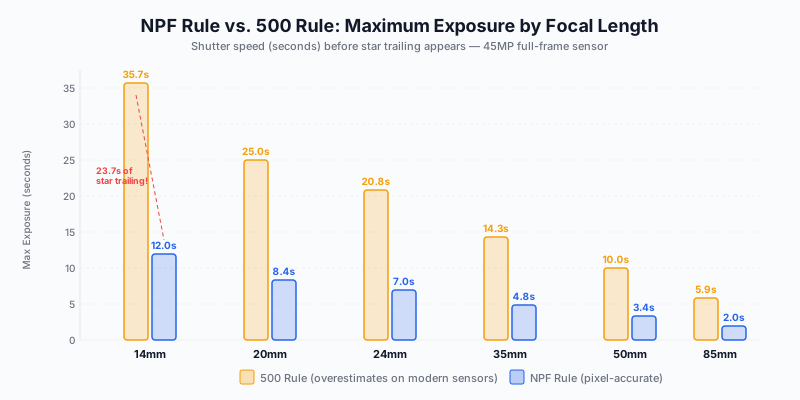
The gap is staggering. At 14mm on a 45MP full-frame body, the 500 Rule says 35.7 seconds. The NPF Rule says 12 seconds. That means the 500 Rule produces nearly 24 seconds of star trailing that your high-resolution sensor faithfully records. At 24mm, the 500 Rule gives you 20.8 seconds; the NPF Rule gives you 7. Every second beyond the NPF limit degrades your star points.
How to Calculate NPF in the Field
You do not need to memorize the NPF formula. Two tools handle it:
PhotoPills: The Spot Stars module calculates your exact maximum exposure time based on your specific camera body, focal length, aperture, and declination. It accounts for your sensor’s pixel pitch automatically. This is the tool most working astrophotographers use.
Stellarium: The desktop planetarium software helps you plan compositions by showing exactly where the Milky Way core will be at any time, from any location, on any date. Use it to pre-visualize your compositions before driving to a dark site.
NPF Quick Reference for Common Setups
| Camera |
Pixel Pitch |
14mm f/2.8 |
20mm f/1.4 |
24mm f/2.8 |
35mm f/1.4 |
| Sony A7R V (61MP) |
3.76μm |
9.4s |
8.2s |
5.6s |
5.2s |
| Nikon Z8 (45.7MP) |
4.34μm |
11.8s |
9.4s |
6.9s |
5.9s |
| Sony A1 II (50.1MP) |
4.17μm |
10.9s |
8.8s |
6.4s |
5.5s |
| Canon R5 II (45MP) |
4.39μm |
12.0s |
9.6s |
7.0s |
6.0s |
| Hasselblad X2D II (100MP) |
3.76μm |
9.4s |
8.2s |
5.6s |
5.2s |
These numbers are humbling. On a 61-megapixel sensor at 24mm f/2.8, you have less than six seconds before trailing appears. This is why modern astrophotography increasingly relies on either extreme wide-angle lenses, very fast apertures, or star tracker mounts.
Planning Milky Way Visibility by Season and Location
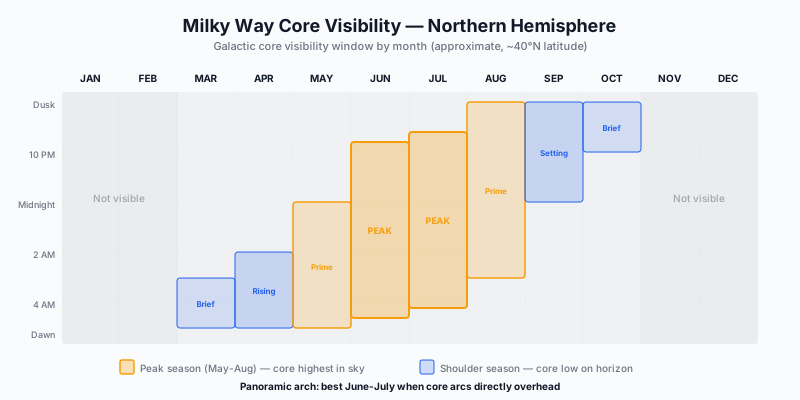
The Milky Way is not equally visible throughout the year. The galactic core, the dense, luminous band of stars and dust lanes that produces the dramatic images you have seen, is only above the horizon during certain months. Shooting at the wrong time of year means you capture the dim outer arm of the galaxy instead of the bright central core. The difference in visual impact is enormous.
Northern Hemisphere Season
Peak season: June through August. The galactic core is highest in the sky and visible for the longest window each night. In June and July, the core arcs directly overhead, creating the conditions needed for a full panoramic arch image. This is when the core transitions from a vertical column on the horizon to a sweeping arc across the entire sky.
Shoulder season: March through May and September through October. The core is visible but low on the horizon and visible for shorter periods. March and April offer the core rising before dawn; September and October show it setting after dusk. These months produce images with the core closer to the horizon, which works well when you have strong foreground elements but limits overhead compositions.
Off-season: November through February. The galactic core is below the horizon during dark hours at northern latitudes. You can still photograph the fainter outer arms of the Milky Way and deep sky objects, but the dramatic core is simply not available.
Latitude Matters
Your latitude determines how high the galactic core rises in the sky. At 25 degrees north (Hawaii, southern Texas, Sahara), the core climbs nearly overhead, providing the best conditions for panoramic arch captures. At 50 degrees north (London, Vancouver, Frankfurt), the core stays closer to the southern horizon, limiting arch photography but still producing strong horizon-oriented compositions.
For arch photographs specifically, latitudes between 25 and 40 degrees north offer the best geometry.
Moon Phase: The Non-Negotiable Variable
A full moon washes out the Milky Way completely. Even a half moon significantly degrades contrast and visibility. Plan your shoots within five days of a new moon. The PhotoPills night AR mode overlays the Milky Way position, moon phase, and moonrise/moonset times on a live view of your surroundings, making field planning precise.
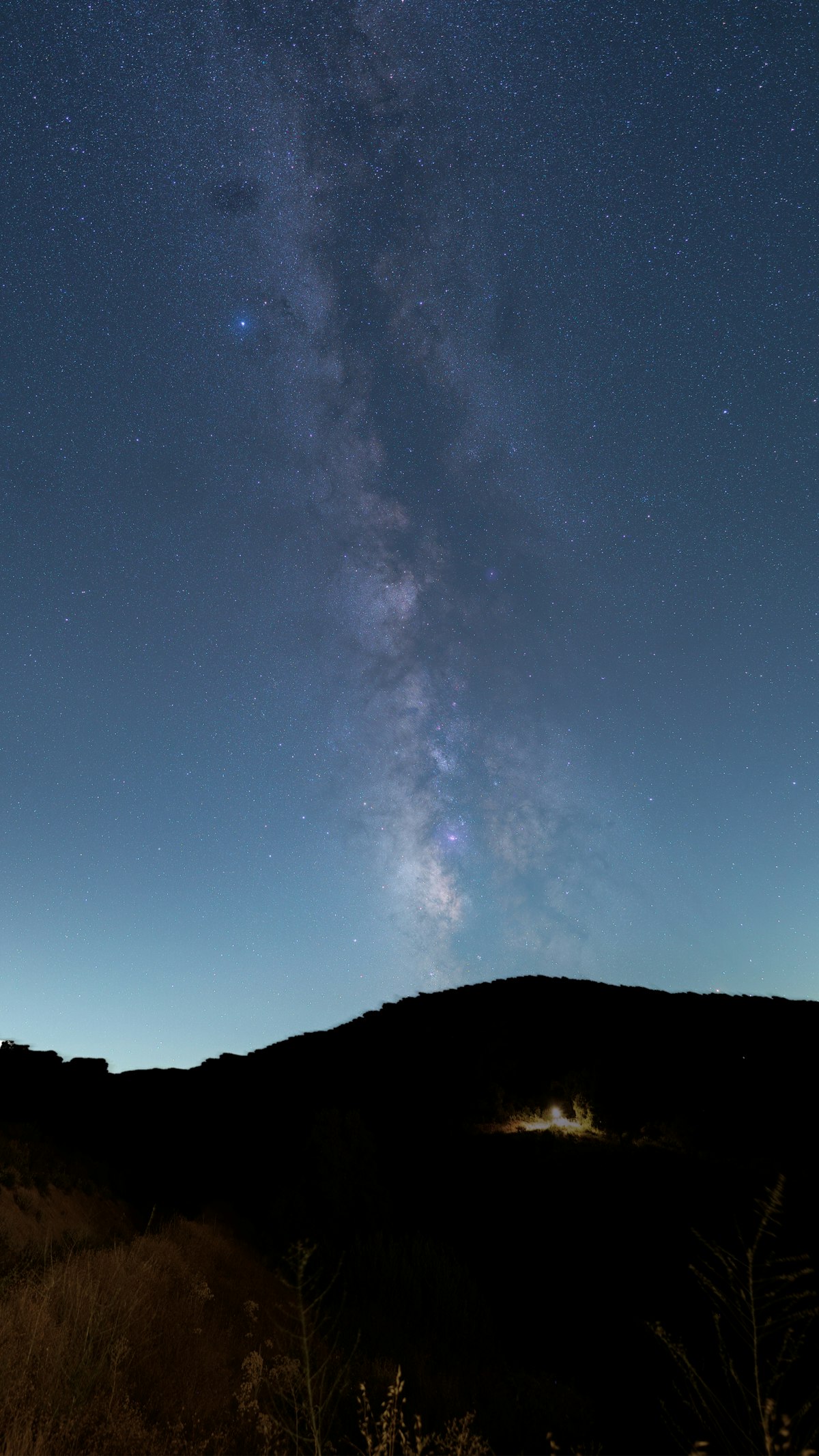
Single-Frame Technique: Maximizing a Fast Ultra-Wide
Before adding complexity with trackers and panoramas, master the single-frame approach. A single well-exposed frame from a fast ultra-wide lens remains the foundation of Milky Way photography.
The Optimal Setup
| Setting |
Value |
Reasoning |
| Lens |
14mm f/1.8 or faster |
Maximum light gathering with widest possible field |
| Aperture |
f/1.8 to f/2.0 |
Wide open or one click down from maximum |
| ISO |
3200-6400 |
Balance signal vs. noise for your specific body |
| Shutter |
NPF-calculated maximum |
Typically 8-12 seconds on modern sensors |
| Focus |
Manual, set on bright star |
See focus section below |
| White Balance |
3800-4200K |
Preserves natural sky color without excessive blue |
| Format |
RAW (14-bit if available) |
Non-negotiable for post-processing latitude |
Shooting Wide Open vs. Stopping Down
Conventional wisdom says to stop down one-third to one-half stop from maximum aperture for improved corner sharpness. On modern premium glass like the Sony 14mm f/1.8 GM or Sigma 14mm f/1.8 Art, the corner performance at f/1.8 is already exceptional. Stopping down to f/2.0 sacrifices light, which in astrophotography is the most precious resource you have.
Test your specific lens. If the corner stars at f/1.8 show acceptable coma (slight wing-like distortion), stay wide open. The additional light gathering outweighs marginal corner improvement. If coma is objectionable, stop down to f/2.0 but no further for single-frame work.
Stacking Untracked Frames
A single frame at ISO 6400 and 10 seconds contains limited signal and significant noise. The professional approach is to capture 15 to 25 identical frames from the same composition and stack them in Sequator (free, Windows) or Starry Landscape Stacker (Mac). The software aligns the stars across frames, and the averaging process reduces noise proportional to the square root of the number of frames. Twenty stacked frames produce approximately 4.5 times less noise than a single frame.
This technique works without a tracker because each individual frame is short enough to avoid trailing. The stacking software handles the slight star movement between frames by aligning stars separately from the landscape, then compositing both layers.
Star Tracker Mounts: Multi-Minute Exposures Without Trailing
A star tracker is a motorized equatorial mount that rotates your camera at the same rate as the Earth, compensating for our planet’s rotation. This lets you expose for minutes instead of seconds, gathering dramatically more light with lower noise.
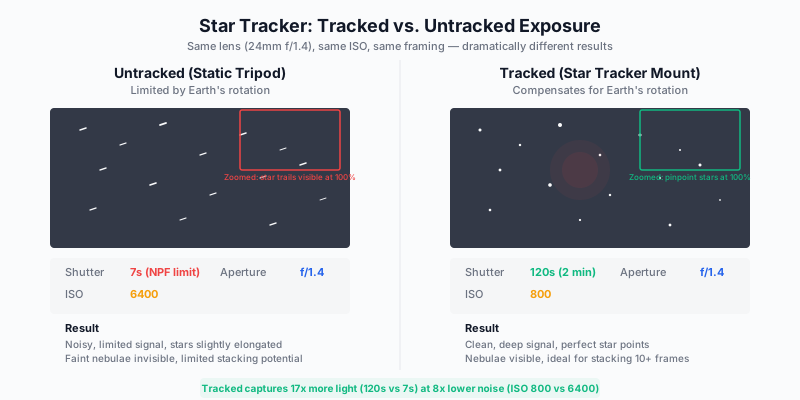
The difference is not subtle. A tracked 2-minute exposure at ISO 800 captures roughly 17 times more light than an untracked 7-second exposure at ISO 6400, with eight times less noise. Faint nebulae, dust lane structure, and star colors that are invisible in untracked single frames become clearly visible in tracked exposures.
Recommended Trackers for Photographers
| Tracker |
Payload |
Weight |
Price |
Best For |
| iOptron SkyGuider Pro |
5 kg (11 lbs) |
1.5 kg |
~$450 |
Camera + lens up to 70-200mm |
| Sky-Watcher Star Adventurer GTi |
5 kg (11 lbs) |
1.7 kg |
~$500 |
WiFi control, go-to capability |
| Move Shoot Move Rotator |
3 kg (6.6 lbs) |
0.4 kg |
~$209 |
Ultra-portable, travel-focused |
| iOptron SkyTracker Pro |
3 kg (6.6 lbs) |
1.0 kg |
~$350 |
Compact, reliable |
Polar Alignment
A star tracker must be aligned with the celestial pole to track accurately. In the Northern Hemisphere, this means pointing the tracker’s polar axis at Polaris. Most trackers include a polar scope, a small built-in telescope that helps you place Polaris precisely within the alignment reticle.
For multi-minute exposures up to 2 minutes, rough polar alignment within 1 degree is sufficient. For exposures beyond 3 minutes, precision alignment using an electronic polar alignment routine (available in apps like SharpCap or the tracker manufacturer’s app) is necessary.
The Tracked-Untracked Blend
Here is the critical limitation: a star tracker follows the stars, which means the landscape blurs during long exposures. The professional solution is the tracked-untracked blend:
- Tracked frame(s): Expose 90 to 180 seconds at ISO 800, f/2.0. The sky is pinpoint-sharp with deep signal.
- Untracked frame(s): Without moving the tripod, stop the tracker, and shoot 10 to 15 seconds at higher ISO for a sharp landscape.
- Blend in Photoshop: Use a luminosity mask or gradient mask along the horizon to merge the tracked sky with the untracked foreground.
This technique produces images with the deep, clean sky of a tracked exposure and the sharp foreground of a static tripod shot. It is the standard workflow for every serious Milky Way photographer producing competition-grade or print-quality work.

The Panoramic Milky Way Arch: Capture and Stitching
The panoramic Milky Way arch, where the galactic core sweeps from horizon to horizon in a single image, is the most visually dramatic composition in astrophotography. It requires stitching multiple frames and demands careful planning and execution.
Planning the Arch
- Timing: June through July, when the core arcs directly overhead at northern latitudes between 25 and 40 degrees
- Orientation: Face south. The core rises in the southeast, arcs overhead, and sets in the southwest
- Tool: PhotoPills Night AR shows the exact arc position overlaid on your camera’s live view, letting you plan the number of frames and camera orientation
Capture Technique
- Lens: 14mm to 24mm. Wider lenses require fewer frames but introduce more distortion at the edges.
- Orientation: Shoot in portrait (vertical) orientation. This captures more of the sky per frame and gives the stitching software more overlap to work with.
- Overlap: 30-40% overlap between adjacent frames. More overlap produces better stitching with fewer artifacts.
- Frame count: A full arch typically requires 8 to 14 portrait-orientation frames at 14mm, or 16 to 24 frames at 24mm.
- Sequence: Start from one horizon, pan systematically across the arch, and end at the opposite horizon. Maintain consistent settings across all frames.
- Speed: Complete the entire sequence within 5 minutes to minimize star movement between the first and last frames.
Settings Per Frame
Use the same settings as your single-frame technique. Do not change aperture, ISO, or shutter speed between frames. The stitching software needs consistent exposure across the panorama.
Stitching Software
PTGui Pro is the industry standard for astrophotography panoramas. It handles the complex projection required for wide-field star panoramas better than Lightroom’s built-in merge or Photoshop’s Photomerge, both of which struggle with the nonlinear distortion of ultra-wide night sky images.
Set the projection to equirectangular or cylindrical for arch panoramas. Enable the masking tool to handle any blending issues at frame boundaries.
Foreground Handling
The foreground in a panoramic arch rarely stitches cleanly because the parallax shift between frames distorts ground-level objects. The professional approach: shoot the foreground as a separate panorama at lower ISO with longer exposure (or during blue hour), stitch it independently, and composite the foreground and sky panoramas in Photoshop.
The Bortle Scale and Light Pollution
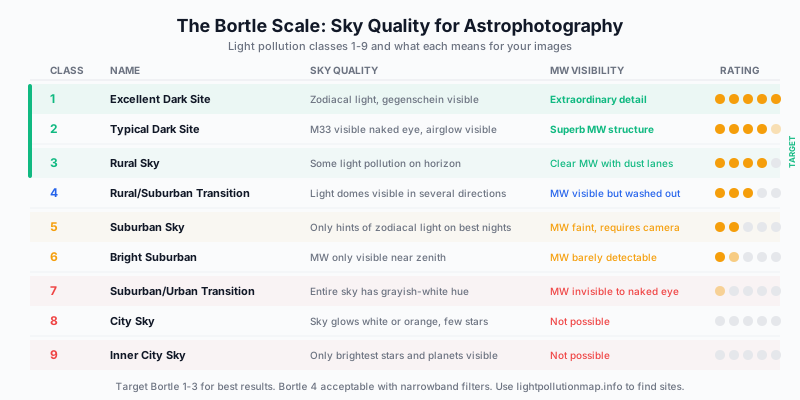
The Bortle Dark Sky Scale, developed by amateur astronomer John Bortle in 2001, classifies sky darkness from 1 (pristine dark sky) to 9 (inner-city glare). Your Bortle class determines what is photographically possible before you even set up the tripod.
What Bortle Class Do You Need?
Bortle 1-2 (excellent to typical dark site): The gold standard. Zodiacal light visible, airglow detectable, the Milky Way casts visible shadows. These sites are increasingly rare and typically require 2 to 4 hours of driving from major cities. National parks, remote deserts, and mountain regions above 6,000 feet offer Bortle 1-2 conditions.
Bortle 3 (rural sky): Excellent for Milky Way photography. Some light pollution visible on the horizon but the overhead sky remains dark. Most rural areas 60 to 90 minutes from medium-sized cities. This is the minimum you should target for serious work.
Bortle 4 (rural/suburban transition): The Milky Way is visible but washed out compared to darker sites. Usable for astrophotography with narrowband filters or heavy processing, but you are fighting the light pollution rather than working with naturally dark skies.
Bortle 5 and above: The Milky Way is faint or invisible to the naked eye. You can detect it on camera with long exposures, but the sky glow creates a flat, washed-out background that limits contrast and requires aggressive processing to overcome. Deep sky detail is largely impossible without specialized narrowband filtration.
Finding Dark Sites
lightpollutionmap.info: The essential tool. It overlays Bortle classes on a world map using satellite data. Find a dark zone within driving distance, identify road access, and check that the terrain is accessible at night.
Clear Outside and Windy.com: Once you have identified a dark site, check cloud cover forecasts. Clear Outside provides hourly transparency and seeing forecasts specifically designed for astronomers and astrophotographers.
Dark Sky Destinations Worth the Journey
| Location |
Bortle |
Why It Excels |
| Death Valley, California |
1-2 |
Reliably clear, dramatic foreground, accessible |
| Big Bend National Park, Texas |
1 |
One of the darkest places in the continental US |
| NamibRand Nature Reserve, Namibia |
1 |
Gold Tier Dark Sky Reserve, southern MW visible |
| Atacama Desert, Chile |
1 |
Driest desert, highest transparency, observatory-grade |
| Aoraki Mackenzie, New Zealand |
1 |
Dark Sky Reserve, southern sky objects visible |
| La Palma, Canary Islands |
1-2 |
Above cloud layer at observatory altitude |
| Jasper National Park, Alberta |
2 |
Dark Sky Preserve, dramatic mountain foregrounds |
Focus Techniques for Pinpoint Stars
Achieving perfect focus at night separates technically excellent astrophotography from the acceptable-on-Instagram results that fall apart under close inspection. A star that is even slightly out of focus bloats into a soft disk, losing its point-like quality and spreading its light across multiple pixels.
The Magnified Live View Method
This is the most reliable approach and should be your default:
- Switch to manual focus and enable Live View on your rear LCD or EVF.
- Point at a bright star or planet: Jupiter, Vega, Sirius, or Arcturus work well depending on season.
- Zoom Live View to maximum magnification (10x on most cameras).
- Slowly rotate the focus ring until the star contracts to the smallest, tightest point possible. It should appear to snap into a tiny pinpoint.
- Lock the focus ring position with a strip of gaffer tape or use your lens’s focus lock switch if equipped.
- Take a test frame and review at 100% zoom to confirm.
Bahtinov Mask
A Bahtinov mask is a patterned filter that fits over your lens and creates a distinctive diffraction spike pattern. When focus is precise, the central spike aligns perfectly between the two outer spikes. When focus is off, the central spike shifts to one side. This provides an unambiguous visual indicator of focus accuracy that removes subjective guessing.
Bahtinov masks are available for most lens filter diameters from $15 to $30. For photographers using fast primes like the 14mm f/1.8 or 20mm f/1.4 where focus precision at maximum aperture is critical, a Bahtinov mask is a worthwhile investment.
Focus Stability
Temperature changes throughout the night cause metal and glass to expand and contract, shifting focus position. After 2 to 3 hours, recheck focus even if you taped the ring. Fast temperature drops (common in desert environments) accelerate this drift. If you are shooting panoramic sequences that span 30 minutes or more, verify focus at the beginning and end of the sequence.
Processing Milky Way Images: Stretching Without Destroying
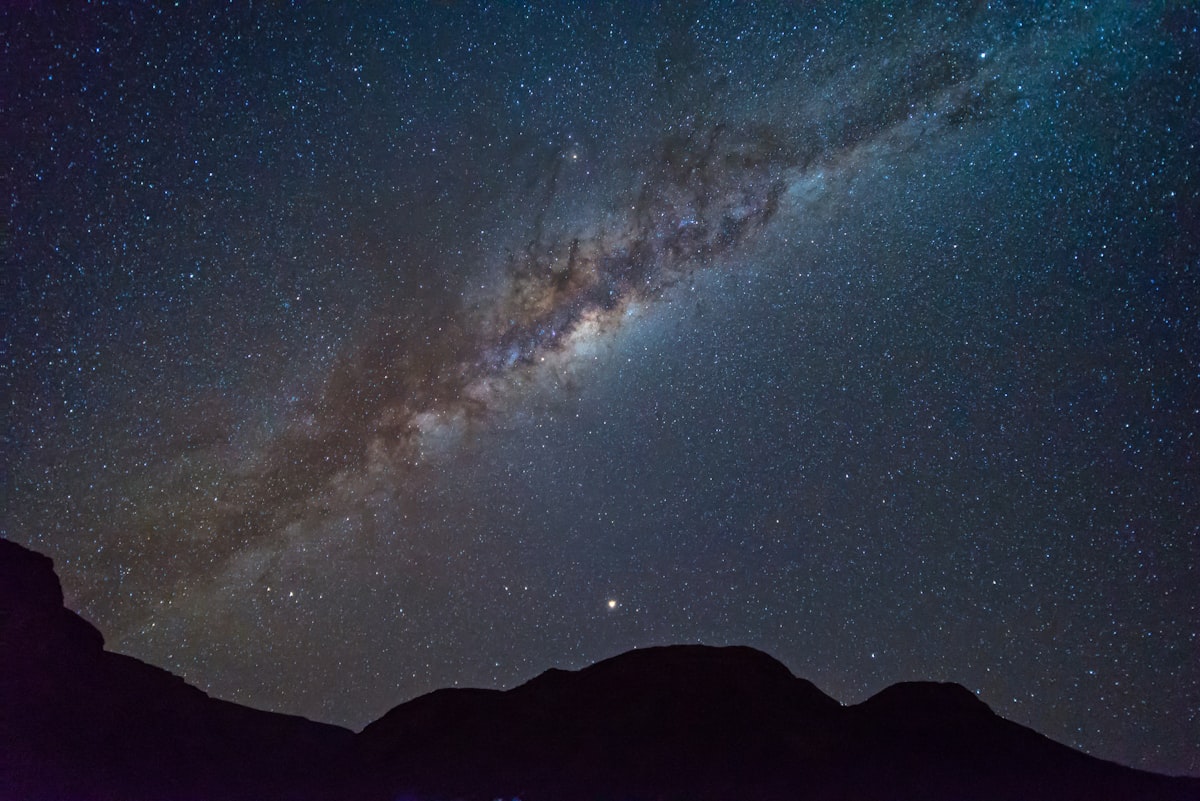
The Milky Way in a single properly exposed RAW frame looks disappointingly faint. The galactic core appears as a vague brightening against a dark background. The drama you see in finished astrophotography images comes from careful processing that stretches the faint signal while controlling noise and preserving natural color relationships.
The Processing Pipeline
Step 1: White balance and lens corrections. Set white balance to 3800-4200K for natural sky color. Apply lens profile corrections to remove vignetting and distortion. Vignetting correction is particularly important for astrophotography because the darkened corners of an uncorrected ultra-wide frame look like uneven light pollution.
Step 2: Initial stretch. This is where the Milky Way emerges. In Lightroom, increase Exposure by +1.0 to +1.5 stops. This brightens the entire frame including the background. Then reduce Blacks by -20 to -40 to push the sky background back toward darkness. The goal is to brighten the Milky Way while keeping the background sky dark.
Step 3: Targeted Milky Way enhancement. Use a luminosity mask or Lightroom’s Select Sky mask to isolate the Milky Way band. Within this selection, increase Clarity by +30 to +50 and Dehaze by +15 to +25. These adjustments enhance the dust lane structure and small-scale contrast within the galaxy without affecting the foreground.
Step 4: Color calibration. The Milky Way contains real color: warm golden tones in the core, blue-white in the outer arms, dark reddish-brown in the dust lanes. Use the HSL panel to fine-tune these relationships. Reduce orange luminance slightly to deepen the core. Increase blue saturation modestly to enhance the outer arms. Do not invent color that is not present in the data.
Step 5: Noise reduction. Apply luminance noise reduction conservatively. Heavy noise reduction destroys the fine star points and dust lane texture that define the image. For single frames at high ISO, Topaz DeNoise or DxO PureRAW process the file before Lightroom and typically produce cleaner results than Lightroom’s built-in noise reduction. For stacked frames, the stacking process itself reduces noise, and additional noise reduction should be minimal.
Step 6: Star management. In dense star fields, the sheer number of bright stars can compete visually with the Milky Way structure. Starnet++ (free) or the Star Reduction actions in Astronomy Tools for Photoshop can selectively reduce star size while preserving the nebulae and galaxy structure. Use this sparingly. Removing too many stars creates an artificial appearance.
The Saturation Trap
Over-saturated Milky Way images are the astrophotography equivalent of over-processed HDR. The temptation to push saturation until the core glows electric gold and the sky turns deep cobalt blue is strong, and social media rewards it. But viewers who have stood under a Bortle 1 sky know what the Milky Way actually looks like: subtle, complex, and more silver than gold. Process for accuracy, not for likes.
Bryan Peterson, in Understanding Exposure, emphasizes that the most impactful images are those that reveal truth rather than fabricate it. The Milky Way is already extraordinary. Your job is to reveal its structure, not reinvent it.
Advanced Technique: Deep Sky Targets Within the Milky Way
Once you have mastered wide-field Milky Way photography, the galactic core itself contains deep sky objects that reward closer attention with moderate telephoto lenses and star trackers.
Worthwhile Targets for Camera Lenses
| Target |
Type |
Best Lens |
Tracker Required |
Notes |
| Rho Ophiuchi Cloud Complex |
Nebula |
135-200mm |
Yes |
Most colorful region in the sky |
| Lagoon Nebula (M8) |
Emission Nebula |
135-200mm |
Yes |
Bright, pairs with Trifid Nebula |
| Sagittarius Star Cloud (M24) |
Star Cloud |
85-135mm |
Recommended |
Dense Milky Way patch, stunning detail |
| North America Nebula (NGC 7000) |
Emission Nebula |
85-135mm |
Yes |
Large, responds to Ha modification |
| Cygnus Region |
Milky Way |
35-85mm |
Recommended |
Rich star fields, dark nebulae |
These targets are accessible with a star tracker and a fast telephoto lens. A 135mm f/2 or 200mm f/2.8 on a tracker, shooting 90-second exposures and stacking 20 to 40 frames, produces results that were impossible without a telescope a decade ago.
Exercises for Developing Astrophotography Skill
Exercise 1: The NPF Calibration Test
On the next clear night, set up on your back porch or driveway (sky darkness does not matter for this exercise). Shoot a bright star field at your NPF-calculated maximum exposure. Then shoot the same field at 500 Rule exposure. Compare both at 100% zoom. This exercise builds visceral understanding of why the NPF Rule matters and eliminates any temptation to revert to the 500 Rule.
Exercise 2: Stacking Practice Session
Capture 25 identical untracked frames of any section of the Milky Way using your single-frame settings. Download Sequator (Windows) or Starry Landscape Stacker (Mac) and process the stack. Compare the stacked result to a single frame at 100% zoom. The noise reduction from stacking will be immediately obvious, and you will understand why stacking is worth the extra capture time.
Exercise 3: Focus Precision Drill
Practice the magnified Live View focusing technique until you can achieve perfect star focus in under two minutes. Then shoot a test frame, defocus slightly, and refocus. Repeat ten times. Consistency is the goal. You need this skill to be automatic before you are standing in a dark field at 2 AM with the Milky Way overhead and your patience limited.
Exercise 4: Bortle Comparison
Shoot the same section of the Milky Way from two locations: one at Bortle 5 (suburban) and one at Bortle 3 or better (rural). Use identical settings. Compare the RAW files in Lightroom. This exercise demonstrates why dark sky sites matter and why no amount of processing can fully compensate for light pollution.
Exercise 5: The Tracked-Untracked Blend
If you own a star tracker, practice the blend workflow. Shoot a 2-minute tracked sky exposure and a 10-second untracked foreground. Blend them in Photoshop using a soft gradient mask along the horizon. Refine the blend until the transition is invisible. This is the single most important astrophotography post-processing skill to master.
Conclusion
Astrophotography is the most technically demanding discipline in the photographic spectrum. It requires an understanding of celestial mechanics, optical physics, sensor technology, and processing technique that no other genre demands in combination. The learning curve is steep, the gear investment is significant, and the conditions are physically uncomfortable.
But on a moonless night, standing under a Bortle 1 sky with the Milky Way arcing overhead from horizon to horizon, you will understand why photographers drive hours into the desert, hike to mountain summits, and endure bitter cold. The galaxy is the largest, most ancient subject you will ever photograph. It has been there for 13 billion years. Your job is to develop the technical mastery to do it justice.
Start with single frames and the NPF Rule. Progress to stacking. Add a tracker when you are ready for the tracked-untracked blend. Plan your shoots around new moons, dark sites, and seasonal visibility windows. Process with restraint. The Milky Way does not need your help to be remarkable. It needs your skill to be visible.