You Own a Drone. Now What?
You spent two thousand dollars on a Mavic 4 Pro. You charged the batteries, updated the firmware, and flew it straight up to 120 meters on your first outing. You pressed the shutter. You brought home a dozen images that look exactly like Google Earth screenshots.
This is the drone photography trap. The technology is so capable that it obscures a fundamental truth: a drone is not a camera with wings. It is a flying tripod that demands an entirely different compositional vocabulary, a different relationship with light, and a different set of skills than anything you have learned holding a camera at eye level.
Dirk Dallas, whose Eyes over the World became the definitive book on aerial composition, puts it bluntly: the aerial perspective does not make images better by default. It makes them different. And different is only valuable when you control what that difference means.
This guide covers the flight techniques, altitude strategies, and light management methods that transform drone flights into aerial photographs worth printing. These are the techniques I use on every expedition, refined across hundreds of flights with the Mavic 4 Pro, Air 3S, and Mini 4 Pro.
Understanding Altitude as a Compositional Variable
On the ground, you choose your composition by moving your feet and adjusting focal length. In the air, you have a third variable that changes everything: altitude. And altitude does not merely give you a higher vantage point. It fundamentally transforms what composition means.
At 10 meters, your drone sees the world much as a person standing on a rooftop would. Subjects have depth, texture, and dimensionality. At 120 meters, those same subjects flatten into patterns, and the relationship between elements becomes graphic rather than spatial. Understanding what each altitude zone offers is the single most important flight skill for a landscape photographer.
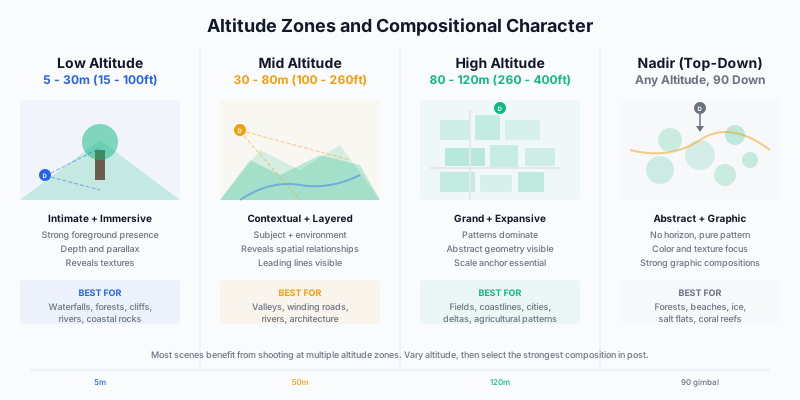
Low Altitude: 5 to 30 Meters
Low altitude is the most underused zone in drone photography, and it produces the most compelling images. The reason most photographers neglect it is psychological: you bought a flying machine, so you want to fly high. Resist that instinct.
At 5 to 30 meters, the drone captures perspectives that are impossible from ground level but still maintain the depth and dimensionality that makes photographs feel immersive. A waterfall seen from 15 meters reveals the full cascade and plunge pool in a single frame. A coastal rock formation photographed from 10 meters at an oblique angle shows the geology and the ocean interaction simultaneously. A forest clearing from 20 meters creates an intimate aerial portrait.
The key technical consideration at low altitude is obstacle clearance. Below 30 meters, terrain features, trees, power lines, and buildings all enter your flight space. Use the Mavic 4 Pro’s omnidirectional obstacle sensing as a safety net, but never rely on it as your primary awareness tool. Maintain visual line of sight and know your escape routes before descending.
Settings at low altitude: Aperture f/5.6 to f/8 for maximum sharpness. The variable aperture on the Mavic 4 Pro gives you this control; on fixed-aperture drones like the Air 3S (f/1.8) and Mini 4 Pro (f/1.7), use ND filters to manage exposure. At low altitude, depth of field matters because near and far objects have meaningful distance separation.
Mid Altitude: 30 to 80 Meters
Mid altitude is where most landscape drone photography happens, and for good reason. At 30 to 80 meters, the drone captures both the subject and its environment in a single frame. A lone farmhouse in a valley, a winding road through autumn forest, a river system feeding into a lake: these compositions work because you see the subject in context without losing it in the larger landscape.
This is also the altitude zone where leading lines become most powerful. Roads, rivers, ridgelines, and shorelines create natural compositional paths that guide the viewer through the frame. At ground level, these lines may be obscured by terrain. At maximum altitude, they flatten into abstract patterns. At mid altitude, they retain enough three-dimensionality to function as genuine leading lines while being fully visible from above.
The oblique angle advantage: At mid altitude, tilt your gimbal to approximately 30 to 45 degrees below horizontal rather than pointing straight down. This oblique angle preserves the sense of depth and distance that makes aerial photographs feel like elevated landscape photography rather than maps. The Mavic 4 Pro’s 70-degree upward tilt capability means you can also look slightly upward at mountain faces from mid altitude, a perspective no previous consumer drone could achieve.
High Altitude: 80 to 120 Meters
High altitude serves a specific compositional purpose: pattern revelation. At 80 meters and above, individual elements dissolve into textures and repetitions. Agricultural fields become geometric mosaics. Forest canopy becomes a broccoli-textured carpet. Urban blocks become circuit boards.
The challenge at high altitude is that patterns alone rarely make compelling photographs. You need an interruption, a single element that breaks the pattern and gives the viewer’s eye a place to rest. A red barn in a green field. A river cutting through a grid of farmland. A shadow line from a cloud crossing an otherwise uniform landscape. Without that interruption, your photograph is wallpaper.
Scale anchors: At high altitude, the viewer cannot gauge the size of what they are looking at without a familiar reference point. Include a road, a vehicle, a boat, or a building to establish scale. Without these anchors, a photograph of sand dunes from 120 meters is indistinguishable from a macro photograph of crumpled fabric.
The Nadir Decision
Shooting straight down (nadir, or 90-degree gimbal tilt) removes the horizon entirely and creates purely two-dimensional compositions. Nadir works brilliantly for certain subjects: forest canopy, beach patterns, river deltas, coral reefs visible through clear water, salt flat textures, and agricultural geometry.
But nadir fails for most traditional landscape subjects. Mountains, valleys, and coastlines need depth to communicate their grandeur. Use nadir deliberately and sparingly, not as a default because you pointed the camera down and forgot to adjust the gimbal.
Five Essential Flight Patterns
How you move the drone determines what you see. Most drone photographers fly to a spot, hover, and shoot. That is the aerial equivalent of standing on a sidewalk and taking a photograph without moving your feet. Deliberate flight patterns unlock compositions you would never discover from a static hover.
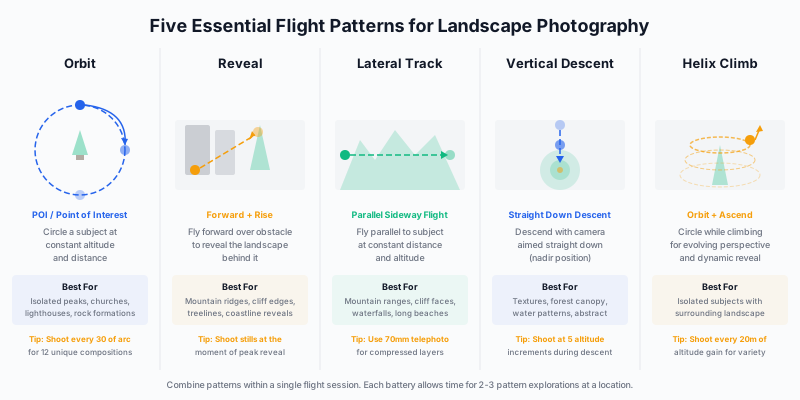
Pattern 1: The Orbit
Circle your subject at a constant altitude and distance. The Mavic 4 Pro’s Point of Interest mode automates this, but manual orbiting gives you finer control over speed and camera angle.
The orbit is the aerial equivalent of walking around a sculpture in a gallery. Every 30 degrees of arc presents a different relationship between your subject, its background, and the light. A lighthouse that looks ordinary from the east might be extraordinary from the west when backlit by the setting sun.
Technique: Set your orbit radius wide enough that the subject fills roughly one-third of the frame. Shoot a photograph every 30 degrees of arc. After a full rotation, you have twelve unique compositions of the same subject. At least two of those twelve will be significantly stronger than the others. Without orbiting, you would likely have missed them.
Pattern 2: The Reveal
Fly forward over an obstacle to reveal the landscape behind it. The reveal works because it creates the aerial equivalent of a foreground-to-background transition that landscape photographers achieve on the ground with wide-angle lenses and near-far compositions.
The classic reveal: start behind a ridgeline, fly forward until the valley beyond comes into view, and shoot the moment the full landscape reveals itself. The ridgeline provides a natural leading edge, and the revealed landscape provides the subject. The Mavic 4 Pro’s Infinity Gimbal makes this easier because you can pan the camera during the reveal without repositioning the aircraft.
Timing the shot: Do not shoot continuously during the reveal. Watch your monitor and fire the shutter at the precise moment when the composition is strongest. Usually this is when the foreground obstacle occupies the bottom 20 to 30 percent of the frame and the revealed landscape fills the rest.
Pattern 3: The Lateral Track
Fly parallel to a linear subject at a constant distance and altitude. Use this for mountain ranges, cliff faces, long beaches, and river corridors. The lateral track reveals the full extent of a linear feature that is impossible to capture from any single position.
Switch to telephoto: The lateral track is where the Mavic 4 Pro’s 70mm medium telephoto camera earns its value. Shooting at 70mm while tracking parallel to a cliff face compresses the geological layers and creates images with the visual depth of a ground-based telephoto landscape. The Air 3S offers the same 70mm option. On the Mini 4 Pro’s single 24mm camera, fly closer to the subject to achieve a similar effect.
Pattern 4: The Vertical Descent
Start at maximum altitude with the camera pointed straight down, then descend slowly while shooting at regular intervals. This sequence produces a set of images at different scales of the same location, and the scale shift between frames is dramatic.
A vertical descent over a river delta might start as an abstract pattern at 120 meters and end as a detailed texture study at 15 meters. The images from mid-descent often produce the strongest compositions because they combine enough pattern recognition with enough detail to be visually rich.
Pattern 5: The Helix Climb
Combine an orbit with a gradual altitude gain. Start low and close to your subject, then slowly spiral upward and outward. The helix reveals the subject’s relationship to its environment as you climb, creating a natural visual narrative from intimate detail to grand context.
This pattern works exceptionally well for isolated subjects: a single tree on a hillside, a mountain cabin, a coastal lighthouse, or a volcanic cone. The helix captures the subject at every scale, from close portrait to environmental wide shot, in a single continuous flight.
Golden Hour Flight Strategy
Light management from the air operates on different rules than light management on the ground. The most important difference: at altitude, the sun angle you experience is not the same as the sun angle on the ground below.
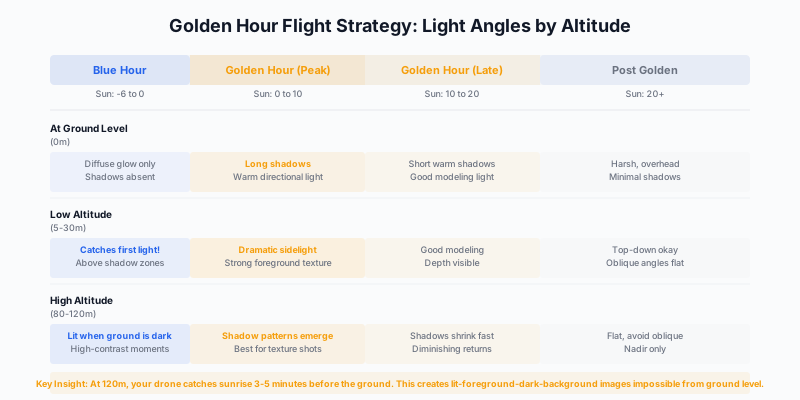
The Altitude Light Advantage
At 120 meters above ground level, your drone catches direct sunlight approximately three to five minutes before sunrise hits the ground, and holds sunlight three to five minutes after sunset darkens the ground surface. This creates a window of extraordinary contrast where the drone photographs a sunlit landscape while the ground-level shadows remain deep and dramatic.
Use this window deliberately. Launch your drone before sunrise and climb to maximum altitude. At the moment when the first horizontal rays strike the landscape from above, you capture shadow patterns that have maximum length and definition. From ground level at that same moment, those shadows are falling toward you and away from you, compressed and difficult to see. From altitude, you see them stretching across the terrain like dark rivers.
Shadow Patterns as Subjects
Shadows from low-angle light are compositional elements in aerial photography, not just the absence of light. Trees cast long shadow fingers across fields. Buildings project geometric shadows across streets. Mountain ridges throw shadow curtains across valleys. From altitude, especially at nadir or steep oblique angles, these shadows can dominate the composition and become the subject.
The best shadow photography happens in the first and last 20 minutes of direct light. After that, the sun angle steepens and shadows shorten rapidly. Plan your golden hour flights to be airborne and at altitude the moment the sun breaks the horizon.
Backlighting from Above
Backlighting at ground level requires careful exposure management because the bright sky fills a large portion of the frame. From a drone at oblique angle, you can position the camera so the backlit subject sits against a darker ground background rather than against the sky. This makes backlighting far easier to expose correctly from altitude than from ground level.
Water is the ultimate backlit aerial subject. A lake, river, or ocean backlit by low sun creates a blazing highlight against darker surrounding terrain. Use spot metering on the water surface and expose for the highlights; let the shadows go deep. The Mavic 4 Pro’s 16-stop dynamic range allows significant shadow recovery in post, so protecting highlights is the priority.
The Blue Hour from Above
Blue hour (the 20 to 30 minutes before sunrise or after sunset when the sky glows deep blue) is underused in drone photography because the light is dim and most photographers have packed up. But the Mavic 4 Pro’s f/2.0 aperture and improved high-ISO performance make blue hour aerial photography genuinely viable.
Settings for blue hour: Aperture wide open (f/2.0 on Mavic 4 Pro, f/1.8 on Air 3S), ISO 400 to 800, shutter speed 1/30 to 1/60 second. The gimbal stabilization on current DJI drones holds steady enough for these shutter speeds in calm conditions. Remove ND filters. Accept slightly higher ISO noise in exchange for capturing light that no one else is shooting.
Wind Management
Wind is the drone landscape photographer’s primary adversary. It affects image sharpness, flight stability, battery life, and your willingness to fly at all. Learning to read, predict, and work within wind conditions is a survival skill.
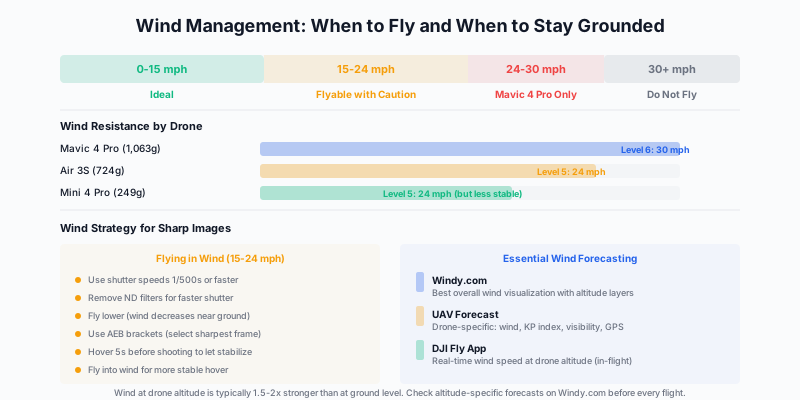
Wind at Altitude vs. Ground Level
The wind your drone experiences at 100 meters is typically 1.5 to 2 times stronger than the wind you feel at ground level. A pleasant 10 mph breeze on your face means 15 to 20 mph at altitude. This catches many new drone pilots off guard.
Before every flight, check altitude-specific wind forecasts on Windy.com. The app displays wind speed at multiple altitude layers, allowing you to see whether the wind at your planned flight altitude is within your drone’s tolerance. The DJI Fly app also reports real-time wind speed at the drone’s position during flight, but by that point you have already committed to the flight.
UAV Forecast is another essential app that consolidates wind speed, visibility, GPS satellite count, and KP index (relevant for compass interference) into a single drone-specific forecast. Check it before driving to your location.
Sharpness in Wind
Wind degrades image sharpness in two ways: it causes the drone to shift position during exposure (motion blur), and it causes the gimbal to work harder to maintain stability, which can introduce micro-vibrations.
For tack-sharp images in wind:
| Wind Speed |
Shutter Speed Minimum |
ND Filter |
Notes |
| 0-10 mph |
1/250s |
Use as needed |
All drones stable |
| 10-15 mph |
1/500s |
Remove if needed |
Light drones (Mini) may wobble |
| 15-20 mph |
1/800s |
Remove |
Air 3S and heavier only |
| 20-25 mph |
1/1000s+ |
Remove |
Mavic 4 Pro only |
| 25-30 mph |
Do not fly for stills |
N/A |
Wind gusts exceed stable hover |
The hover-and-settle technique: After positioning your drone at the desired location, release all control sticks and wait five full seconds before pressing the shutter. This allows the drone to stabilize into a GPS-locked hover. Any residual drift from your stick inputs has time to settle. In gusty conditions, wait even longer and shoot burst mode, then select the sharpest frame.
Wind and Battery Life
Flying into or against wind dramatically reduces flight time. The Mavic 4 Pro’s rated 51-minute flight time drops to 30 to 35 minutes in 20 mph wind because the motors work continuously to maintain position. Plan shorter flights and carry more batteries when wind is forecast.
Fly patterns into the wind first: Start each flight by flying into the headwind to reach your furthest point while battery power is highest. Then fly downwind back toward your launch position, which requires less motor effort. This ensures you always have a tailwind advantage when battery is lowest.
Long Exposure Aerials
Long exposure from a drone is technically challenging but produces images that are impossible to achieve any other way. Smoothed water surfaces, cloud motion, and wave patterns captured from 100 meters above the ocean create a visual language unique to aerial photography.
The Physics of Drone Long Exposure
A drone is not a tripod. It is a hovering platform that constantly micro-adjusts its position using GPS and barometric sensors. Even in zero wind, the drone drifts by small amounts. This drift limits your practical maximum exposure time.
| Drone |
Max Practical Exposure (Calm) |
Max Practical Exposure (Light Wind) |
| Mavic 4 Pro |
2-4 seconds |
1-2 seconds |
| Air 3S |
1-2 seconds |
0.5-1 second |
| Mini 4 Pro |
0.5-1 second |
Not recommended |
These limits apply to single-frame long exposures. For longer effects, capture multiple short exposures and stack them in post-processing.
ND Filter Selection for Aerial Long Exposure
The Mavic 4 Pro’s variable aperture (f/2.0 to f/11) reduces the need for ND filters compared to fixed-aperture drones, but you still need them for true long exposure work. At f/11 in bright sunlight, your base exposure is approximately 1/250 second at ISO 100. To reach a 1-second exposure, you need an ND256 (8-stop) filter.
Recommended aerial ND stack:
| Filter |
Stops |
Resulting Exposure at f/8, ISO 100, Bright Sun |
| ND8 |
3 |
1/30s |
| ND64 |
6 |
1/4s |
| ND256 |
8 |
1s |
| ND1000 |
10 |
4s |
For the Air 3S and Mini 4 Pro with fixed apertures, you need stronger ND filters to achieve the same exposure times. An ND1000 on the Air 3S (f/1.8) achieves approximately 2-second exposures in midday sun.
PolarPro, Freewell, and NiSi all manufacture quality ND filters for current DJI drones. Avoid no-name filters. On a sensor this small, optical quality degradation from a cheap filter is immediately visible.
Best Subjects for Aerial Long Exposure
- Coastlines: 1 to 2 second exposures smooth individual waves into a misty wash around rocks. From 30 to 50 meters, this creates ethereal compositions impossible from the beach.
- Waterfalls: Even a half-second exposure from altitude smooths cascading water into silk. Combined with the elevated perspective, the result shows the full waterfall system in a single soft-water frame.
- Rivers: Smoothing river surface reflections from above creates mirror-like corridors winding through the landscape.
- Cloud shadow movement: At 2 to 4 seconds, moving cloud shadows create soft gradients across the terrain below.
Panorama and Multi-Row Techniques from Air
The built-in panorama modes on DJI drones produce decent results for social media, but they compress the files and limit your control over stitching. For serious panoramic work, capture frames manually and stitch in dedicated software.
Manual Drone Panorama Workflow
- Lock exposure and white balance: Switch to manual exposure and manual white balance before beginning the panorama sequence. Auto settings that shift between frames create stitching nightmares.
- Shoot RAW: Never shoot panorama frames as JPEG. The tonal headroom in RAW files allows you to match exposures perfectly before stitching.
- Overlap at least 40 percent: Each frame should overlap the previous frame by 40 to 50 percent. This gives the stitching software enough common detail to align frames accurately. For a single-row panorama spanning 180 degrees, this means approximately 8 to 10 frames.
- Use the 70mm telephoto: Shooting panorama frames at 70mm rather than 28mm produces dramatically higher resolution results. A 10-frame panorama at 70mm yields a file with four to five times the resolution of a single 28mm frame.
- Stitch in PTGui or Lightroom: PTGui Pro produces the highest quality stitches with the most control over projection type. Lightroom’s Photo Merge works well for simpler panoramas and is faster.
Multi-Row Panorama for Maximum Resolution
For truly massive resolution files suitable for large-format printing, shoot a multi-row panorama grid. Capture a full row of overlapping frames at one gimbal angle, then tilt the gimbal down 20 to 25 degrees and shoot another full row. A 3-row by 8-column grid at 70mm on the Mavic 4 Pro produces a stitched file exceeding 300 megapixels.
Timing: A multi-row panorama takes 2 to 3 minutes to capture. Light must remain consistent throughout the sequence. Rapidly changing light (partly cloudy skies, fast-moving sunrise color) makes multi-row panos unreliable. Wait for stable light.
Hyperlapse: Time-Based Aerial Photography
Hyperlapse is time-lapse photography with camera movement, and from a drone it produces results that rival helicopter cinematography. While hyperlapse is primarily a video technique, the individual frames from a well-executed hyperlapse often yield powerful still photographs.
Waypoint Hyperlapse Technique
The DJI Fly app’s Waypoint mode lets you set up to five waypoints with specific positions, altitudes, and camera angles. The drone flies between waypoints automatically, capturing photos at set intervals.
Settings for landscape hyperlapse:
- Interval: 2 seconds (allows up to 1-second shutter speed)
- Shutter speed: 1/2 to 1 second (use ND filters to achieve this)
- Photo format: RAW
- Video duration: 10 to 15 seconds (produces 240 to 360 frames)
The 1-second shutter speed is deliberate. Just as ground-based timelapse benefits from motion blur on moving elements, aerial hyperlapse benefits from slight motion blur on water, clouds, and vegetation. This blur creates temporal continuity between frames and makes the final video smoother. But each individual frame, with its carefully blurred water and sharp terrain, also stands alone as a long-exposure still photograph.
Orbit Hyperlapse
Set a Point of Interest and let the drone orbit while capturing hyperlapse frames. The resulting footage shows a subject rotating through an evolving light and shadow pattern. For landscape photographers, orbit hyperlapse around a peak, lighthouse, or coastal formation during golden hour captures the shifting light in a way that no single photograph can.
The Pre-Flight Checklist for Landscape Photographers
Before every landscape drone flight, work through this checklist. It takes two minutes and prevents the common failures that ruin expeditions.
| Step |
Action |
Why It Matters |
| 1 |
Check Windy.com for altitude-specific wind |
Wind at 120m may be double ground level |
| 2 |
Check UAV Forecast for GPS and KP |
High KP = compass interference risk |
| 3 |
Open DJI Fly and check no-fly zones |
Geo-fencing may restrict your location |
| 4 |
Verify battery charge (all batteries) |
Cold depletes charge during transit |
| 5 |
Set camera to RAW + manual exposure |
Auto settings shift between frames |
| 6 |
Set white balance manually |
Prevents color shift mid-sequence |
| 7 |
Mount ND filter before launch |
Changing filters requires landing |
| 8 |
Plan flight pattern and altitude zones |
Wasted flight time = wasted battery |
| 9 |
Identify emergency landing spots |
Know where to put it down fast |
| 10 |
Check local regulations |
Legality varies by exact location |
Exercises for Building Flight Skills
Exercise 1: The Altitude Bracket
Choose a single subject and photograph it from 10, 30, 60, 90, and 120 meters. At each altitude, shoot both oblique (30-degree gimbal tilt) and nadir (straight down). Review all ten images at home and identify which altitude and angle produced the strongest composition. Repeat this exercise at five different locations to build intuitive altitude selection.
Exercise 2: The Orbit Composition Finder
Pick an isolated subject (lighthouse, lone tree, rock formation) and orbit it at mid altitude, shooting every 30 degrees. Review all twelve frames. Identify the best composition and analyze why it works: was it the light angle? The background relationship? The shadow position? This exercise trains you to see how orbital position affects every element of the composition.
Exercise 3: The Golden Hour Sprint
During one golden hour session, fly three complete battery cycles. On the first battery, shoot only low altitude (under 30m). On the second, shoot only mid altitude (30-80m). On the third, shoot only high altitude (80-120m). Compare the three sets to understand how altitude interacts with golden hour light.
Exercise 4: Wind Sharpness Test
On a moderately windy day (12-18 mph), photograph the same scene at 1/125, 1/250, 1/500, and 1/1000 second. Zoom to 100% and identify the minimum shutter speed that produces acceptably sharp images with your specific drone in your specific wind conditions. This number becomes your personal wind threshold.
Exercise 5: Manual Panorama Mastery
Capture a 10-frame manual panorama at 70mm, ensuring 50% overlap between frames. Stitch in PTGui or Lightroom. Then capture the same scene as a single 28mm wide frame. Compare the stitched panorama to the single frame at 100% zoom. The resolution difference will convince you that manual panoramas are worth the effort.
Conclusion
The gap between a drone pilot and an aerial photographer is not measured in flight hours or firmware updates. It is measured in the deliberateness of every decision: the altitude you choose, the pattern you fly, the moment you press the shutter, and the light conditions under which you choose to be airborne.
Every technique in this guide comes back to one principle: do not let the drone fly the photograph. You fly the photograph. The drone is the tool. Choose your altitude for compositional purpose, not convenience. Fly patterns that explore a subject from multiple angles before committing to a composition. Time your flights to match the light that serves your vision. Work within wind rather than against it.
The aerial photographs that stop people in their tracks are never the ones taken at maximum altitude with the camera pointed straight down. They are the ones where a photographer made fifty conscious decisions about altitude, angle, timing, and light before pressing the shutter once. Make those decisions deliberately, and your drone becomes a creative tool as powerful as any lens in your bag.