The Color Photograph That Should Have Been Black and White
You have taken a photograph that checks every technical box. Sharp focus, proper exposure, strong composition. The colors are accurate, the light is dramatic, and the scene has visual weight. But something is wrong. The image sits flat. The reds fight the greens. The blue sky competes with the earth tones. There is too much information, and none of it feels essential.
You convert it to black and white on a whim. The image transforms. Without color to distract, the composition reveals itself. The light becomes the subject. The tonal relationships between shadow and highlight create a three-dimensional depth that the color version never achieved. You are looking at the same photograph, but you are seeing it for the first time.
This is not a trick. It is a discipline, the oldest discipline in photography, and one that remains the ultimate test of a photographer’s ability to see. Color is generous. It forgives weak composition, flat light, and muddled visual hierarchy because the eye is seduced by hue. Black and white is unforgiving. It strips the image down to light, form, and texture. Either the photograph works on those terms, or it does not work at all.
This guide covers the complete black and white discipline: seeing in monochrome before you press the shutter, understanding the zone system as a framework for tonal control, mastering the conversion process in Lightroom and Silver Efex, building tonal contrast that creates depth without gimmickry, and preparing files for the fine art prints where black and white photography reaches its fullest expression.
Pre-Visualization: Seeing Without Color
Ansel Adams did not convert photographs to black and white. He pre-visualized them in monochrome before exposing the film. He saw the scene in front of him and simultaneously imagined the final print, understanding how each element would translate from color reality to tonal abstraction.
This skill is learnable. It requires training your eye to see luminance values rather than hues.
The Luminance Hierarchy
Every color has an inherent brightness, its luminance value. A saturated yellow is inherently bright. A saturated blue is inherently dark. A red and a green may appear completely different in color but occupy nearly identical luminance values, which means they merge into the same gray tone in a straight black and white conversion.
This merging is the central challenge of black and white photography. You must learn to see which elements in a scene share similar luminance values and will therefore lose their separation when color is removed.
Training Exercises for Monochrome Vision
The LCD test: Set your camera’s LCD or EVF to monochrome display mode (available on Sony, Nikon, Canon, Fuji, and Leica bodies). Shoot RAW so you preserve full color data, but compose and evaluate using the monochrome preview. This single change will transform how you evaluate scenes.
The squint test: Squinting reduces your eye’s ability to perceive color and emphasizes tonal contrast. Before framing a shot, squint at the scene. The elements that remain visible and separated are the ones that will work in black and white.
The mental subtraction: Before shooting, mentally ask: if I remove color from this scene, what remains? If the answer is “strong light direction, clear form, textural contrast, and tonal separation,” the scene is a black and white candidate. If the answer is “not much,” the scene depends on color and should stay in color.
Subjects That Demand Black and White
Certain subjects and conditions consistently produce stronger black and white images than color:
- Dramatic skies with heavy cloud structure: Cloud texture translates beautifully to monochrome when processed with channel mixing.
- Architectural geometry: Clean lines, repeating patterns, and geometric shadows gain power without color distraction.
- Misty and foggy landscapes: Limited natural color palettes that already approach monochrome.
- Strong directional sidelight: When light itself is the subject, color becomes secondary.
- High-contrast scenes: Deep shadows against bright highlights create the tonal drama that defines great black and white work.
- Textural subjects: Weathered wood, rock faces, water patterns, bark, and sand gain tactile presence in monochrome.
- Portraits in challenging light: Mixed lighting that produces ugly color casts often produces beautiful tonal modeling in black and white.
The Zone System: Digital Interpretation
Ansel Adams and Fred Archer developed the Zone System in the 1940s as a framework for controlling the full tonal range from pure black to pure white. While the original system was designed for sheet film exposure and chemical development, its conceptual framework translates directly to digital photography and processing.
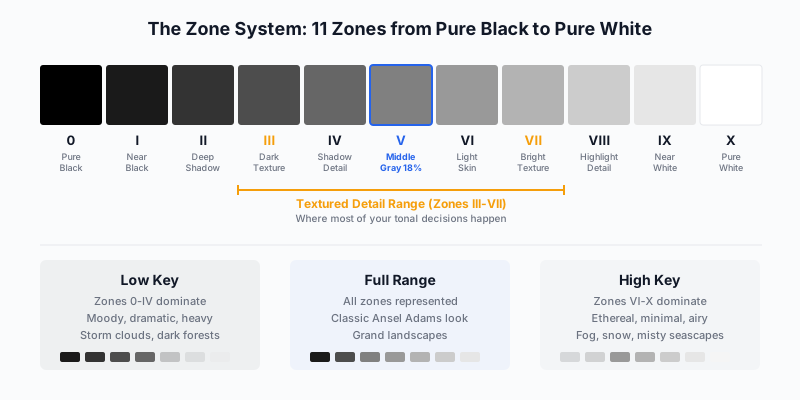
The Zone System divides the tonal range into eleven zones, each representing one stop of exposure. Zone 0 is pure black with no detail. Zone X is pure white with no detail. Zone V is middle gray, the tone your camera’s meter targets when it reads a scene.
The critical zones for photographers are III through VII, the textured detail range. This is where most of your tonal decisions happen.
Applying Zone Thinking to Digital Capture
In practice, zone system thinking means making conscious decisions about where specific scene elements will fall on the tonal scale:
| Scene Element |
Target Zone |
Reasoning |
| Deep shadow areas (cave interiors, dense forest) |
II-III |
Visible texture, hint of detail |
| Mid-shadow (shaded rock, north-facing walls) |
IV |
Clear detail, dark but readable |
| Medium tones (green grass, gray stone, average skin) |
V |
Middle gray, neutral anchor |
| Light tones (bright sand, light-colored buildings) |
VI-VII |
Bright with full texture |
| Highlights (clouds, snow in open shade) |
VIII |
Bright, minimal texture |
| Specular highlights (sun on water, reflections) |
IX-X |
Near-white to pure white |
Expose to the Right (ETTR) for B&W
In digital black and white, overexposing slightly (pushing the histogram to the right without clipping highlights) captures more tonal data in the shadow regions where digital sensors are weakest. This gives you cleaner shadow detail when you darken in post-processing. The Sony A1 II and Nikon Z8, with their 14+ stops of dynamic range, provide enormous latitude for this approach.
Check your histogram after each shot. The right edge should approach but not touch the wall. If highlights clip, back off 1/3 stop. Your RAW file will look slightly overexposed on the LCD, but it contains the maximum tonal information your sensor can capture.
The Conversion: From Color to Monochrome
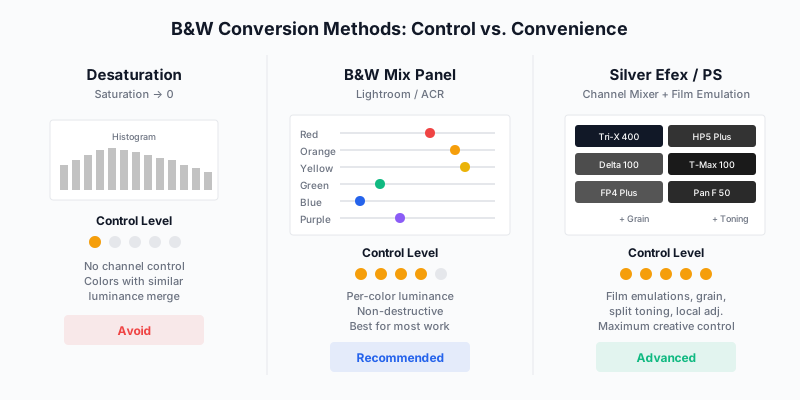
The method you use to convert a color image to black and white determines how much control you have over the final tonal relationships. Not all conversions are equal.
Method 1: Desaturation (Avoid)
Dragging the saturation slider to zero removes color information using a fixed luminance weighting formula. You have no control over how individual colors map to gray tones. A red flower and a green leaf with similar luminance will merge into identical gray. The image will look flat and lifeless.
Do not use this method for serious work.
Method 2: Lightroom B&W Mix Panel (Recommended)
When you click “Black & White” in Lightroom’s treatment selector, you gain access to eight channel sliders: Red, Orange, Yellow, Green, Aqua, Blue, Purple, and Magenta. Each slider controls how bright or dark that color becomes in the monochrome conversion.
This is where the creative control lives. Consider a landscape with a blue sky and golden grass:
- Pull the Blue slider left (-30 to -50): The sky darkens dramatically, creating the deep, moody sky that defines classic landscape black and white. This replicates the effect of a red or orange filter on black and white film.
- Push the Yellow and Orange sliders right (+20 to +40): The golden grass brightens, creating tonal separation between earth and sky.
- Adjust the Green slider based on vegetation: Darker greens create drama; brighter greens create an airy, luminous feel.
The B&W Mix panel is the single most important tool in your black and white workflow. Spend time with it. Learn how each slider affects different scene elements. The difference between a flat conversion and a masterful one often comes down to ten minutes of channel mixing.
Method 3: Nik Silver Efex Pro (Advanced)
Silver Efex Pro remains the gold standard for dedicated black and white processing. It offers everything Lightroom provides plus film emulation, realistic grain simulation, and local contrast tools designed specifically for monochrome work.
Key Silver Efex capabilities that Lightroom lacks:
- Film emulations: Accurate simulations of Kodak Tri-X 400, Ilford HP5, Fuji Neopan, and dozens more. Each emulation applies a specific tonal curve, grain pattern, and contrast character.
- Structure control: Silver Efex’s structure slider operates differently from Lightroom’s clarity. It enhances fine-scale tonal contrast without the halo artifacts that heavy clarity can introduce.
- Control points: Circular local adjustments that affect only areas with similar tonal values, allowing precise zone-by-zone control.
- Split toning: More nuanced toning controls for warm shadows, cool highlights, or selenium/sepia toning that references traditional darkroom processes.
The Recommended Workflow
For maximum control:
- Develop in Lightroom first: Exposure, white balance (yes, white balance matters for B&W because it shifts channel values), highlight/shadow recovery, and lens corrections.
- Apply the B&W mix: Use the channel sliders to establish your basic tonal relationships.
- Optionally pass to Silver Efex: For film emulation, grain, and advanced local contrast work.
- Return to Lightroom: For final masking, local adjustments, and output sharpening.
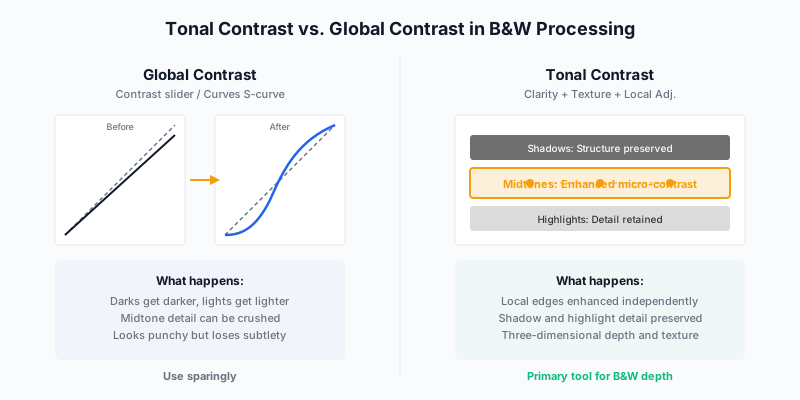
The single most common mistake in black and white processing is reaching for the global contrast slider. Pulling contrast to +40 or +50 makes shadows darker and highlights brighter, but it does so uniformly, crushing midtone detail where most of the image’s visual information lives.
Tonal contrast, sometimes called local contrast or micro-contrast, is the professional’s tool. It enhances the luminance difference between adjacent areas without affecting the overall tonal range. The result is an image that appears three-dimensional, with texture and depth that global contrast cannot create.
Building Tonal Contrast in Lightroom
Lightroom offers three tools that create tonal contrast:
Clarity (+15 to +35 for most B&W work): Enhances mid-frequency contrast, the contrast between areas roughly the size of facial features or tree branches. Moderate clarity adds punch. Excessive clarity creates halos around high-contrast edges. For black and white landscape work, +20 to +30 is the productive range.
Texture (+10 to +25): Enhances fine-scale detail contrast without affecting larger structures. Texture boosts the appearance of rock grain, water ripples, bark patterns, and fabric weave. It is subtle but its absence is noticeable, especially in prints.
Dehaze (+5 to +15): Increases contrast specifically in low-contrast areas, which are typically atmospheric haze zones. For black and white landscapes shot through atmospheric conditions, a gentle dehaze boost recovers tonal separation in distant elements.
The Three-Layer Approach
Professional black and white processing uses tonal contrast at three scales:
- Global tone curve: Set the overall tonal distribution. A slight S-curve adds contrast to the midtones while preserving shadow and highlight detail. Do not push this aggressively.
- Clarity and texture: Build mid-frequency and fine-frequency contrast across the entire image.
- Local masks: Apply targeted contrast adjustments to specific areas using luminance, color, and brush masks. Darken a sky locally. Brighten a foreground rock. Add clarity to a mountain face while keeping smooth water untouched.
This three-layer approach creates images with depth and dimension that a single contrast slider can never achieve.
Channel Mixing for Specific Landscape Elements
Different landscape elements respond to channel mixing in predictable ways. Learn these relationships and you can pre-visualize how your color image will translate to monochrome before you even open Lightroom.
Skies
Blue skies contain predominantly blue channel information. Darkening the blue slider in the B&W mix panel darkens the sky, which:
- Creates dramatic contrast between sky and clouds
- Adds visual weight to the upper portion of the image
- Replicates the deep-sky look of Ansel Adams’s iconic landscapes
| Blue Slider Setting |
Visual Effect |
Film Equivalent |
| 0 (default) |
Natural sky tone |
No filter |
| -20 to -30 |
Moderately darker sky |
Yellow filter |
| -40 to -60 |
Dramatically dark sky |
Orange filter |
| -60 to -80 |
Near-black sky, white clouds pop |
Red filter |
Vegetation
Green vegetation contains green and yellow channel information. The interplay between these two sliders determines whether foliage appears dark and brooding or bright and luminous.
- Dark foliage (Green -20, Yellow -10): Creates weight and density in forested areas. Works well for moody, atmospheric scenes.
- Luminous foliage (Green +30, Yellow +20): Brightens leaves and grass, creating a glowing, ethereal quality. Works for spring and summer scenes where you want the landscape to feel alive.
Water
Still water reflects sky, so it responds primarily to the Blue and Aqua sliders. Moving water, foam, and mist are inherently white or near-white and sit in Zones VII-IX regardless of channel mixing.
For seascapes, experiment with the Aqua slider independently of the Blue slider. Aqua affects turquoise and teal tones common in shallow water, while Blue affects deeper water and sky reflections.
Rock and Earth
Rock tones vary widely, from warm sandstone (Orange/Yellow channels) to cool granite (Blue/Gray, close to neutral). Test your specific scene by moving individual sliders and observing which channels the rock responds to. Warm-toned rock often benefits from slight darkening to create weight and visual anchoring.
Grain: The Texture of Authenticity
Digital sensors produce images with no grain. The tonal transitions are perfectly smooth, the shadows are noise-free (at base ISO), and the result can look sterile. Film grain, even in fine-grained films like Ilford Pan F 50 or Kodak T-Max 100, introduced a randomized texture that softened the clinical perfection of a smooth tonal field.
Adding grain to digital black and white images is not about nostalgia. It is about visual texture. A subtle grain field:
- Breaks up smooth tonal transitions that can look artificial in large prints
- Adds tactile presence that makes the image feel physical rather than digital
- Unifies different tonal areas under a single textural layer
- Reduces the visibility of noise patterns that digital sensors produce in shadows
Grain Settings in Lightroom
| Parameter |
Setting Range |
Effect |
| Amount |
15-30 |
How visible the grain is |
| Size |
25-40 |
Grain particle size (larger for larger prints) |
| Roughness |
40-60 |
Variation in grain particle size |
Start conservatively. Grain should be visible when you pixel-peep at 100% but should not be the first thing a viewer notices at normal viewing distance. For gallery prints at 24x36 inches, grain amount around 20-25 with size 30-35 provides a natural film-like texture without calling attention to itself.
Film Emulation Presets
If you want the look of a specific film stock, Silver Efex’s emulations are more accurate than Lightroom’s grain controls alone. Key film stocks for landscape work:
- Kodak Tri-X 400: Medium grain, rich midtones, slightly warm shadow tone. The most popular black and white film in history. Excellent for dramatic landscapes and street photography.
- Ilford HP5 Plus 400: Slightly finer grain than Tri-X, more neutral shadow tone, excellent latitude. The British alternative to Tri-X with a slightly different character.
- Ilford Delta 100: Very fine grain, exceptional tonal range, cooler tone. Ideal for images where you want maximum detail and a pristine tonal field.
- Kodak T-Max 100: Extremely fine grain with a distinctive tonal curve that emphasizes midtone contrast. Clean and modern-looking.
- Ilford Pan F 50: The finest grain of any conventional film. Almost no visible grain even in large enlargements. For images where absolute smoothness matters.
Toning: Beyond Pure Black and White
Pure black and white images contain only neutral gray tones from black to white. Toning shifts those neutral tones toward a color, adding warmth, coolness, or a specific aesthetic character.
Common Toning Approaches
Warm tone (slight sepia): Shifts shadows and midtones toward brown/gold. Creates a sense of warmth, nostalgia, and earthiness. Natural for landscape and architectural subjects. In Lightroom, add a subtle warm tone using the Color Grading panel: Shadows hue around 40 (gold), saturation 5-10.
Cool tone (selenium): Shifts shadows toward blue-purple. Creates a sense of distance, mystery, and coldness. Traditional in fine art darkroom printing. Shadows hue around 240 (blue-purple), saturation 3-8.
Split tone (warm shadows, cool highlights): The most sophisticated toning approach. Warm shadows create visual weight and grounding. Cool highlights create luminosity and air. The combination adds dimensional depth that neither warm nor cool toning achieves alone.
Toning should be subtle. If a viewer immediately notices the tone, you have gone too far. The tone should feel like part of the image’s atmosphere, not an applied effect.
Dodging and Burning: Directing the Eye
Dodging (lightening) and burning (darkening) specific areas of a print is as old as the darkroom itself. Adams spent hours dodging and burning each print, treating the negative as a starting point and the print as the finished work.
In Lightroom, dodging and burning happens through masks:
The Vignette Burn
A gentle darkening of the image edges draws the eye toward the center. The Post-Crop Vignetting tool (Effects panel) applies this globally. For black and white work, Amount -15 to -25 with Midpoint 40-50 creates a subtle framing effect.
Luminance Range Masks
Select and adjust only highlights, midtones, or shadows using luminance range masks. This is zone-system thinking made practical: “I want Zone III shadows in the foreground to move toward Zone II for more weight” becomes a luminance mask targeting the shadow range with -0.3 exposure.
Brush Masks for Precision
For specific areas that need attention:
- Brighten eyes in a rock face or building facade to draw attention
- Darken a sky that needs more drama than the channel mix alone provides
- Add local contrast to a mountain face while keeping smooth water untextured
- Lighten a path or leading line to strengthen compositional flow
The rule: dodge and burn should be invisible. The viewer should feel guided through the image without being aware of the guidance.
If you shoot a Hasselblad X2D, Fuji GFX 100S II, or any medium format system, you have a significant advantage in black and white photography. The larger sensor captures more tonal information per pixel, producing smoother gradations and finer tonal transitions than full-frame sensors.
Practical implications:
- Smoother zone transitions: The step from Zone IV to Zone V is represented by more tonal levels on a medium format sensor. The result is visible in large prints as smoother gradations in skies and water.
- Lower noise floor: Medium format sensors at base ISO produce virtually noise-free files, giving you a clean canvas for grain addition (adding grain to a noisy image produces a different, less attractive texture than adding grain to a clean one).
- 16-bit output: Both the X2D and GFX systems output 16-bit RAW files that provide 65,536 tonal levels per channel. For black and white work where you are often pushing and pulling tones aggressively, this bit depth prevents the banding that can appear in 14-bit files during heavy processing.
- Print scale: The 100+ megapixel files from these systems produce prints at 40x60 inches and beyond without interpolation, which is the scale where black and white fine art commands the highest prices.
Printing Black and White: The Final Act
The screen is a rough draft. The print is the work. Nowhere is this more true than in black and white photography, where the physical presence of a print, its weight, texture, surface, and tonal depth, communicates something that no screen can replicate.
Paper Selection for B&W
Paper choice is more consequential in black and white than in color. Without color to carry the image, the paper’s tonal character becomes a defining element.
- Cotton rag matte (Hahnemuhle Photo Rag 308): The classic fine art choice. Deep shadows are slightly lifted compared to baryta, but the texture of the paper itself adds physical presence. Museum and gallery standard.
- Baryta (Hahnemuhle Photo Rag Baryta 315 or Canson Baryta Prestige 340): The closest inkjet equivalent to traditional darkroom fiber-based silver gelatin prints. Deeper blacks (higher Dmax) than matte papers. The subtle sheen adds luminosity without the reflections of glossy.
- Glossy (for face-mount acrylic only): Maximum Dmax and tonal range, but mirror reflections make traditional framing problematic. Under acrylic, glossy B&W prints achieve a luminous depth that approaches backlit transparency viewing.
The Three-Black-Ink Advantage
The Epson P900’s ten-ink system includes Photo Black, Light Black, and Light Light Black. This three-level black ink system produces neutral, grain-free monochrome prints with no metamerism (color shifting under different light sources). Canon’s PRO-300 achieves similar neutrality through its Chroma Optimizer coating. Either printer produces gallery-quality black and white output.
Soft Proofing B&W
Soft proofing is even more critical for black and white than for color. The monitor displays a backlit, luminous image. The print reflects ambient light through ink on paper. The dynamic range of the print is always lower than the screen.
When soft proofing B&W:
- Enable “Simulate Paper & Ink” in the soft proof settings. This dims the display to approximate the print’s reduced Dmax.
- Pay attention to shadow separation. Shadows that appear distinct on screen may merge in print. If your Zone II and Zone III areas look identical in the soft proof, lift the shadows in your proof copy.
- Add slightly more clarity (+5 to +10) in the proof copy to compensate for the reduced contrast of reflective media.
Exercises: Building Your Monochrome Eye
Exercise 1: The 30-Day Monochrome Challenge
Set your camera’s EVF/LCD to monochrome preview mode and shoot exclusively in black and white for 30 days. Do not convert afterward; pre-visualize and compose in monochrome. Review your images weekly and identify which subjects and conditions consistently produce your strongest monochrome work.
Exercise 2: The Channel Mix Experiment
Take a single landscape image containing blue sky, green vegetation, warm-toned rock, and water. Create five different B&W conversions using radically different channel mix settings. Print all five at 8x10 inches and evaluate them side by side. This exercise proves that the conversion is a creative decision, not a technical one.
Exercise 3: The Zone Assignment
Before processing, write down where you want each major element of the image to fall on the zone scale. “Sky: Zone III. Clouds: Zone VIII. Foreground rock: Zone V. Water: Zone VII.” Then process the image to match your written pre-visualization. Compare the result to a default conversion.
Exercise 4: The Film Match
Choose a classic black and white photograph you admire (an Adams, a Kenna, a Salgado). Study its tonal character: grain, contrast curve, shadow density, highlight luminosity. Process one of your own images to match that tonal character as closely as possible. This reverse-engineering exercise teaches you to see and replicate tonal relationships.
Exercise 5: The Print Comparison
Print the same black and white image on matte cotton rag and baryta paper. Evaluate them under identical lighting. Notice how the paper surface transforms the emotional register of the image. Matte is contemplative; baryta is dramatic. Which serves your image better?
Conclusion
Black and white photography is not a filter. It is not a fallback for images with ugly color. It is a complete visual language with its own grammar, vocabulary, and mastery curve. The photographers who produce great monochrome work, from Ansel Adams through Sebastiao Salgado to Michael Kenna, share one quality: they see in tones before they see in colors.
Developing this vision takes deliberate practice. Shoot with your EVF in monochrome mode. Study the zone system until you can pre-visualize tonal placement. Learn channel mixing until you can darken a sky or brighten foliage with precision. Master tonal contrast until your images have the three-dimensional depth that separates a casual conversion from a considered one.
Then print. Always print. Black and white photography was born on paper, and paper remains its natural home. The screen shows you a draft. The print shows you the work.
As Bruce Barnbaum argues throughout The Art of Photography, the strongest black and white work is not a translation of color but an original vision in a different visual language. Learn that language. It will make you a better photographer in any medium.